How to bill a Big Job in steps
Bill a deposit, a progress payment and the balance as the job moves along.
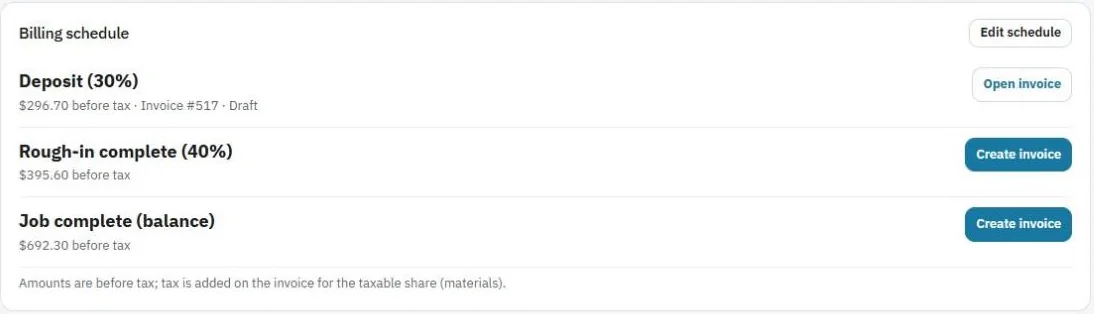
Big Jobs are often billed in steps, for example 30% to start, 40% after rough-in, and the balance at the end.
Set the steps
- Open the Big Job and find Billing schedule.
- Press Edit schedule.
- Add each step with a name and a percent, for example "Deposit" 30%, "Rough-in complete" 40%, "Job complete (balance)".
- Save it. Each step shows its amount, before tax.
Bill a step
When you reach a step, press Create invoice next to it. JobBills makes a draft invoice for that amount, linked to the Big Job. Open it, check it, and send it. See Send an invoice.
Note: Sales tax is added on the invoice for the taxable part (materials). Labor stays non-taxable.
Keep track of the money
The Money card shows the Contract, Invoiced, Paid, Still owed and Left to bill. Invoices made from a visit or from the linked estimate show up here on their own.
Was this guide helpful?
Still stuck? Inside JobBills, press the round ? button to ask the help chat, or email support@jobbills.com.