How to send overdue invoice reminders
Have JobBills email friendly reminders when invoices are past due, or list who's due.
Turn on reminders
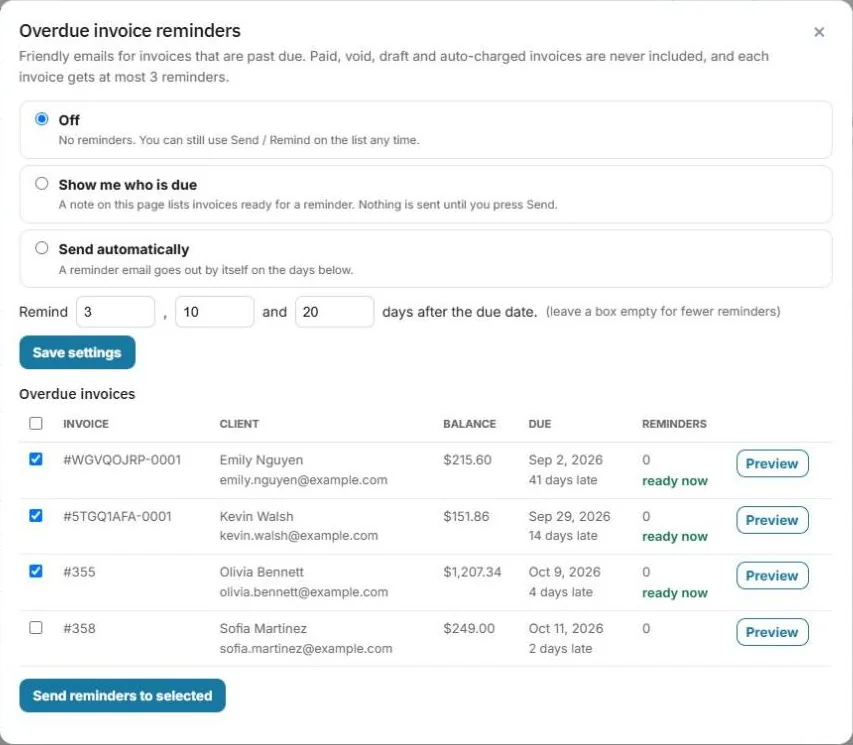
- Go to Invoices and press Reminders.
- Choose how reminders work:
- Off: no reminders. You can still use Send / Remind on the list any time.
- Show me who is due: a note on the Invoices page lists invoices ready for a reminder. Nothing is sent until you press Send.
- Send automatically: a reminder email goes out by itself.
- Set the days after the due date to remind, for example 3, 10 and 20. Leave a box empty for fewer reminders.
- Press Save settings.
Send reminders now
The same window lists your Overdue invoices, how late each one is and how many reminders it has had. Check the ones you want, press Preview to see the email, then press Send reminders to selected.
Good to know
- Paid, void, draft and auto-charged invoices are never included.
- Each invoice gets at most 3 reminders.
- Each reminder includes the link to pay online.
Was this guide helpful?
Still stuck? Inside JobBills, press the round ? button to ask the help chat, or email support@jobbills.com.