What your customer sees when they approve an estimate
How the approval page works, so you can walk a customer through it.
When you send an estimate, your customer gets an email with a button to view it.
- They open the link on their phone or computer. No account or password needed.
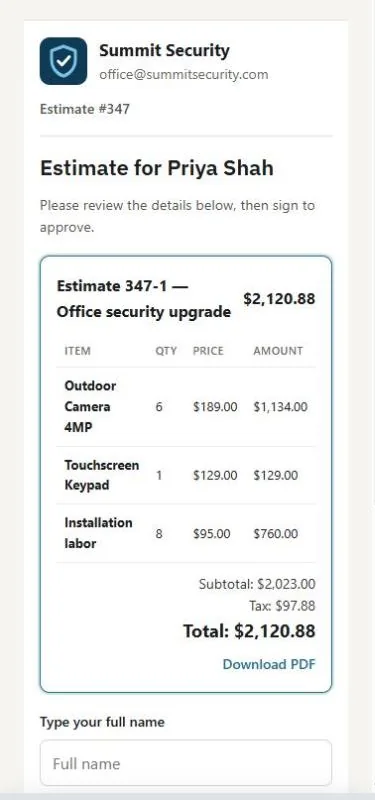
- They see your logo, the lines, totals and any notes. They can press Download PDF.
- If there are options, they choose one first.
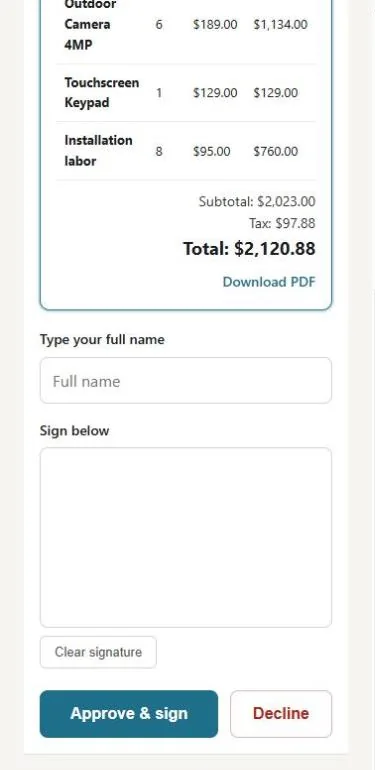
- To approve, they type their full name, sign in the box, and press approve.
- To decline, they press decline and confirm.
You see the status change to Approved or Declined right away, and you get an email (and a phone notification if turned on).
Tip: If a customer says the link doesn't work, it may be old. Send the estimate again to give them a fresh link.
Was this guide helpful?
Related guides
How to send an estimate for approvalHow to give the customer options (Good / Better / Best)How to turn an estimate into an invoice or a jobStill stuck? Inside JobBills, press the round ? button to ask the help chat, or email support@jobbills.com.