How to track leads
Keep people who asked about your services on a simple board until they become clients.
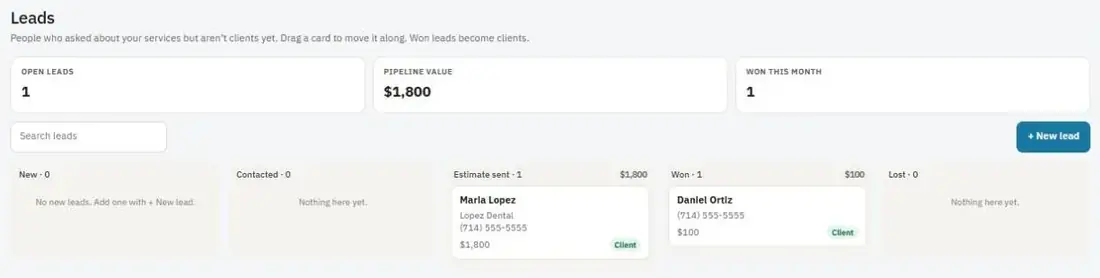
A lead is someone who asked about your services but isn't a client yet. The Leads board keeps them in columns: New, Contacted, Estimate sent, Won and Lost.
Add a lead
- Go to Leads and press + New lead.
- Fill in their Name, Company, Phone, Email and Address.
- Add where they came from (Source), how much the job may be worth (Value) and a follow-up date.
- Save it. The lead shows in the New column.
Move a lead along
Drag the card to the next column as things happen. You can also open the card and change the stage.
When you win
Move the card to Won. The lead becomes a client, and the card shows a link to open the new client page.
The numbers at the top
- Open leads: leads that aren't won or lost yet.
- Pipeline value: the total value of open leads.
- Won this month.
Tip: Search the board to find a lead by name, company, phone, email or notes.
Was this guide helpful?
Still stuck? Inside JobBills, press the round ? button to ask the help chat, or email support@jobbills.com.